flowchart LR
    query --> |embedding| top_k_similar[top similar facts]
    facts_db[(facts database)] --> |embeddings| top_k_similar
    top_k_similar --> |augmented query with facts| LLM(LLM)
    LLM --> answer{{answer}}
Sementic Search with Minimal RAG using Ollama
Retrieval Augmented Generation (RAG) allows for Large Language Models (LLMs) search to incorporate knowledge that they were not trained for originally.
Implementing a simple RAG is relativetly simple and the steps could be summarised as follows:
- read a database of extended facts
- convert facts to embedding vectors that compact the meaning of the fact
- convert the query to embedding vector
- get the top N (where N=3 or 5, typically) most similar facts to the provided query using corresponding embeddings
- build an augmented query with a context by appending it with the most similar facts
- build final prompt with pre-instruction and augmented query
- send to LLM and get output
The RAG system demonstrated here can be broken in 2 parts:
- Prepare Vector Database for the Facts
- Worflow to Process RAG Query
What and Why using Embeddings ?
The embeddings referred in this article are part of a technique in Natural Language Processing called sentence embedding whose idea is to encode a text sentence into a vector that represents meaningful semantic information.
flowchart LR
    sentence["The book is on the table"] --> embedding_model([sentence embedding model]) --> embedding["[ v1 v2 v3 ... v768]"]
Such vectors are more efficient for scalable similarity comparisons that can involve thousands or hundreds of thousands of facts in a database as opposed to compare each character of a query to each character of a fact.
Just like large language models, there are several embedding model available to be chosen, in this example, the chosen embedding model is nomic-embed-text.
Part 1 - Prepare Vector Database for the Facts
First the existing knowledge base represented as facts need to be compacted in a vector format to optimise search efficiency.
flowchart LR
  facts_file[(my_facts.txt)] --> |text facts| convert_to_embedding_vectors[convert to embedding vectors]
  convert_to_embedding_vectors --> |facts embeddings| vector_database[(vectors database)]
Read Fact Database
To keep it simple, for demonstration purposes, the facts will be read from a text file to a text vector:
def read_knowledge_facts(input_text_file: str) -> List:
  dataset = []
  with open(input_text_file, 'r') as file:
    dataset = file.readlines()
    print(f'Loaded {len(dataset)} entries')
  return dataset
Vector Database Format
A vector database should contain 2 columns (or fields):
- sentence - original text sentence
- embedding - vector sentence representation based on sentence embedding
| sentence | embedding |
|---|---|
| Vivamus, Moriendum Est | [ a1 a2 a3 a4 a5 ... ] |
| Condemnant quo non intellegunt | [ b1 b2 b3 b4 b5 ... ] |
| Audentes fortuna iuvat | [ c1 c2 c3 c4 c5 ... ] |
The data above can be saved in a file or database but for the minimal RAG below it will be stored in a vector in memory.
Part 2 - Worflow to Process RAG Query
After vector-based database is created, the second part is about the workflow from the user query all the way to get an answer from chosen Large Language Model.
flowchart LR
   vector_database[(vectors database)] --> |facts embeddings| get_top_most_similar[get top most similar]
   get_top_most_similar --> |query augmented with facts| llm_model([large language model])
   llm_model --> get_answer[get answer]
   read_input_query[read input query] --> convert_query_to_embedding_vector[convert query to embedding vector]
   convert_query_to_embedding_vector --> |query embedding| get_top_most_similar
Developing RAG with Ollama
Ollama is a popular tool to run open-source LLM models in a local machine by providing an interface via CLI or python library from where a developer can pull available models such as Gemma or Qwen as well as Embedding Models such as nomic-embed-text.
In this article, the ollama python library will be used to build the RAG semantic searcher.
- Sentence Embedding
Ollama supports sentence embedding by selecting an Embedding Model and providing the sentence as text input.
An object is returned from ollama.embed that contains the embedding include as part of the object structure.
The whole process is simplified by the function embed_text_input below.
import ollama


def embed_text_input(model, input_text):
  return ollama.embed(model=model, input=input_text)['embeddings'][0]
Testing ….
EMBEDDING_MODEL = 'nomic-embed-text'
text_sentence = 'The book is on the table'

sentence_embedding = embed_text_input(model=EMBEDDING_MODEL, input_text=text_sentence)

print(f"embedding size = {len(sentence_embedding)}")
print(sentence_embedding)
result (vector of 764 items)
embedding size = 768
[0.011797202, 0.06478697, -0.18005921, ..., -0.0026461834, -0.038637, -0.01212106]- Converting Sentences to Sentence Embeddings
Sentences are received as a list of text and should be converted to a structure that serves to keep the original text but also contain the corresponding convertion to an embedding sentence.
This way, each text sentence is converted to a tuple where first key is the original text value and the secont the is corresponding embedding representation.
from typing import List


def convert_facts_to_embeddings_vector(model, dataset: List[str]) -> List:
  vector_database = []
  for i, chunk in enumerate(dataset):
    embedding = embed_text_input(model=model, input_text=chunk)
    vector_database.append((chunk, embedding))
    print(f'Added chunk {i+1}/{len(dataset)} to the database')
return vector_database- Retrieving Facts Related to the Query
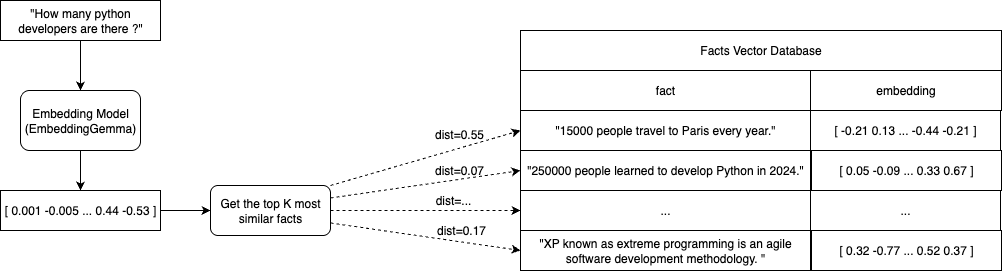
The most relevant facts to the provided query need to be found so this query can be extended with a context that will complement the LLMs knowledge.
To do that, we need a vector distance function (cosine similarity) and a retrieve function that will return the K-most similar fact vectors given a quert vector.
import numpy as np


def cosine_similarity(a, b) -> float:
  return np.dot(a, b) / (np.linalg.norm(a) * np.linalg.norm(b))


def retrieve_top_similar(model, vector_database, query, top_n=3):
  query_embedding = embed_text_input(model=model, input_text=query)
  similarities = []

  for chunk, embedding in vector_database:
    similarity = cosine_similarity(query_embedding, embedding)
    similarities.append((chunk, similarity))

  similarities.sort(key=lambda x: x[1], reverse=True)
return similarities[:top_n]- Instantiating an Large Language Model
When Ollama is installed, it creates a local service where the pulled Large Language Models runs.
That LLM service can be accessed via an available ollama python library as shows in the code snippet below:
import ollama


stream = ollama.chat(
  model='gemma3',
  messages=[
    { "role": "system", "content": "You are a helpful chatbot specialized in story telling." },
    { "role": "user",   "content": "Tell me a very short story of a boy that wanter to be a bear." },
  ],
  stream=True,
)

print('Chat response:')
for chunk in stream:
  print(chunk['message']['content'], end='', flush=True)
Complete Code Listing
Given the functions defined above, we can organise the code the following way:
from typing import List

import ollama
import numpy as np


def read_knowledge_facts(input_text_file: str) -> List:
  dataset = []
  with open(input_text_file, 'r') as file:
    dataset = file.readlines()
    print(f'Loaded {len(dataset)} entries')
  return dataset


def embed_text_input(model, input_text):
  return ollama.embed(model=model, input=input_text)['embeddings'][0]


def convert_facts_to_embeddings_vector(model, dataset: List[str]) -> List:
  vector_database = []
  for i, chunk in enumerate(dataset):
    embedding = embed_text_input(model=model, input_text=chunk)
    vector_database.append((chunk, embedding))
    print(f'Added chunk {i+1}/{len(dataset)} to the database')
  return vector_database


def cosine_similarity(a, b) -> float:
  return np.dot(a, b) / (np.linalg.norm(a) * np.linalg.norm(b))


def retrieve_top_similar(model, vector_database, query, top_n=3):
  query_embedding = embed_text_input(model=model, input_text=query)
  similarities = []

  for chunk, embedding in vector_database:
    similarity = cosine_similarity(query_embedding, embedding)
    similarities.append((chunk, similarity))

  similarities.sort(key=lambda x: x[1], reverse=True)
  return similarities[:top_n]


EMBEDDING_MODEL = 'nomic-embed-text'
LANGUAGE_MODEL = 'gemma3'
KNOWLEDGE_FILE = 'cat-facts.txt'


print('Pulling necessary models ... ')
ollama.pull(EMBEDDING_MODEL)
ollama.pull(LANGUAGE_MODEL)
print('DONE')

fact_dataset = read_knowledge_facts(KNOWLEDGE_FILE)
VECTOR_DB = convert_facts_to_embeddings_vector(EMBEDDING_MODEL, fact_dataset)

input_query = "How many people are bitten by cats in the U.S. annually ?"
retrieved_knowledge = retrieve_top_similar(EMBEDDING_MODEL, VECTOR_DB, input_query)

instruction_prompt = 'You are a helpful chatbot specialized in cats.\n\nUse only the following context below:\n'
instruction_prompt += '\n'.join([ f' - {chunk}' for chunk, similarity in retrieved_knowledge ])

stream = ollama.chat(
  model=LANGUAGE_MODEL,
  messages=[
    {'role': 'system', 'content': instruction_prompt},
    {'role': 'user',   'content': input_query},
  ],
  stream=True,
)

print('Chat response:')
for chunk in stream:
  print(chunk['message']['content'], end='', flush=True)
Result:
Pulling necessary models ...
DONE
Loaded 150 entries
Added chunk 1/150 to the database
Added chunk 2/150 to the database
Added chunk 3/150 to the database
...
Added chunk 149/150 to the database
Added chunk 150/150 to the database
Chat response:
Approximately 40,000 people are bitten by cats in the U.S. annually.